Gigantic
Gigantic by The Signal Supply

The Massive host
I've wanted for years.

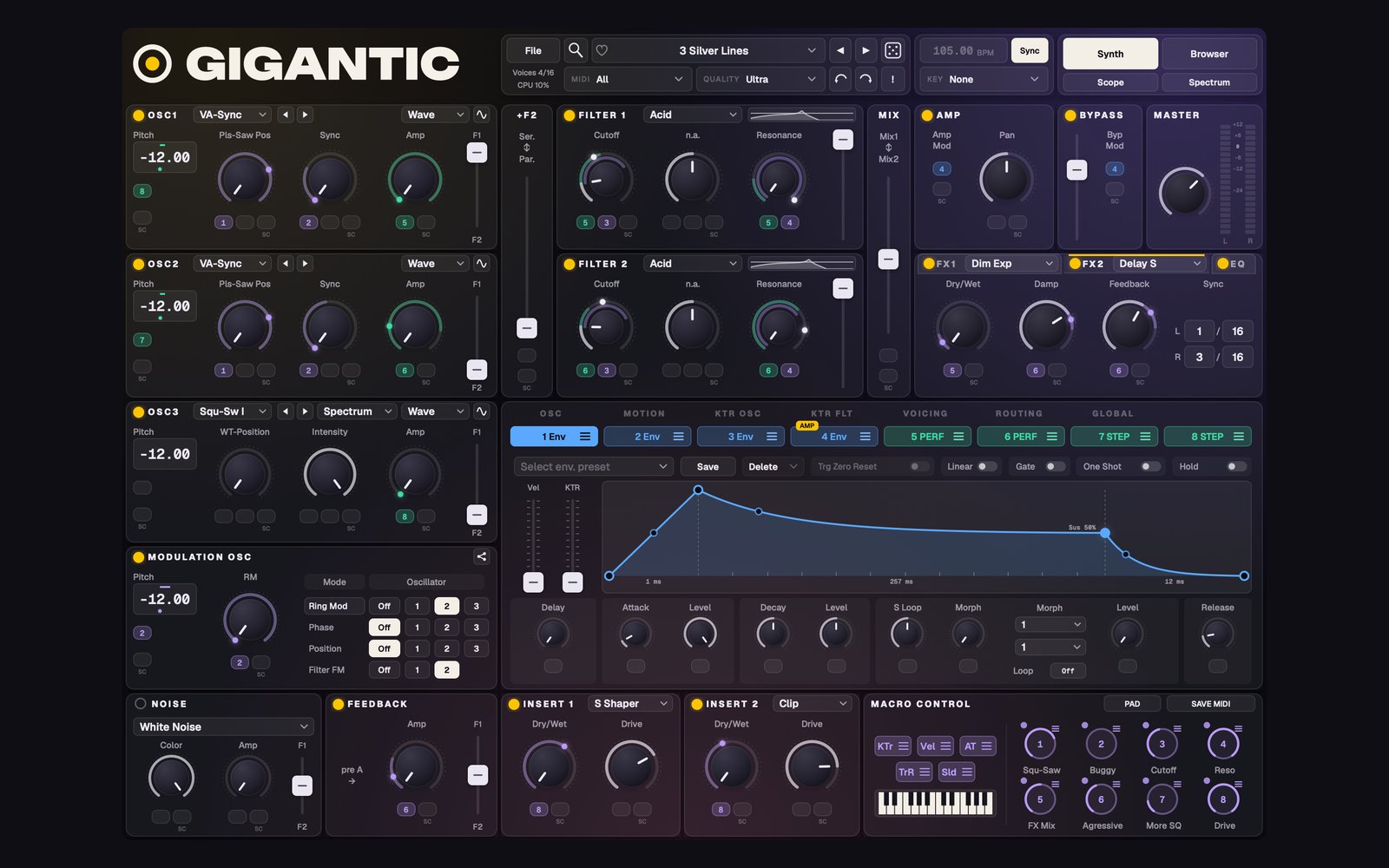
A new front end for your licensed copy of Native Instruments Massive. Your Massive still makes every sound. Gigantic gives it a modern interface and a lot more room to move.
(currently in beta, coming soon)

Join the list Get Gigantic $19 · yours for life

Requires your own licensed copy of Native Instruments Massive. Mac and PC.

What Gigantic is

Massive is still the engine.
Gigantic opens it up.

01

Your sound, unchanged

Every Massive preset you own loads and plays the way it always has. Gigantic adds to Massive and never replaces it.

02

See everything

Live modulation on every knob, playheads on every curve, and every connection in your patch on one page.

03

Go further

A sampler, a granular engine, your own wavetables, morph pads, deeper sequencing and per-note expression, all on top of Massive.

Feature tour

Everything inside

01

Your whole library, ready to play

Nothing to convert.

  • Every preset you own loads and plays the way it always has
  • Open your .nmsv and .ksd sounds right in Gigantic's browser
  • A modern, scalable window, from 75% to 200%
Gigantic's main window
02

See what the patch is doing

Nothing is hidden any more.

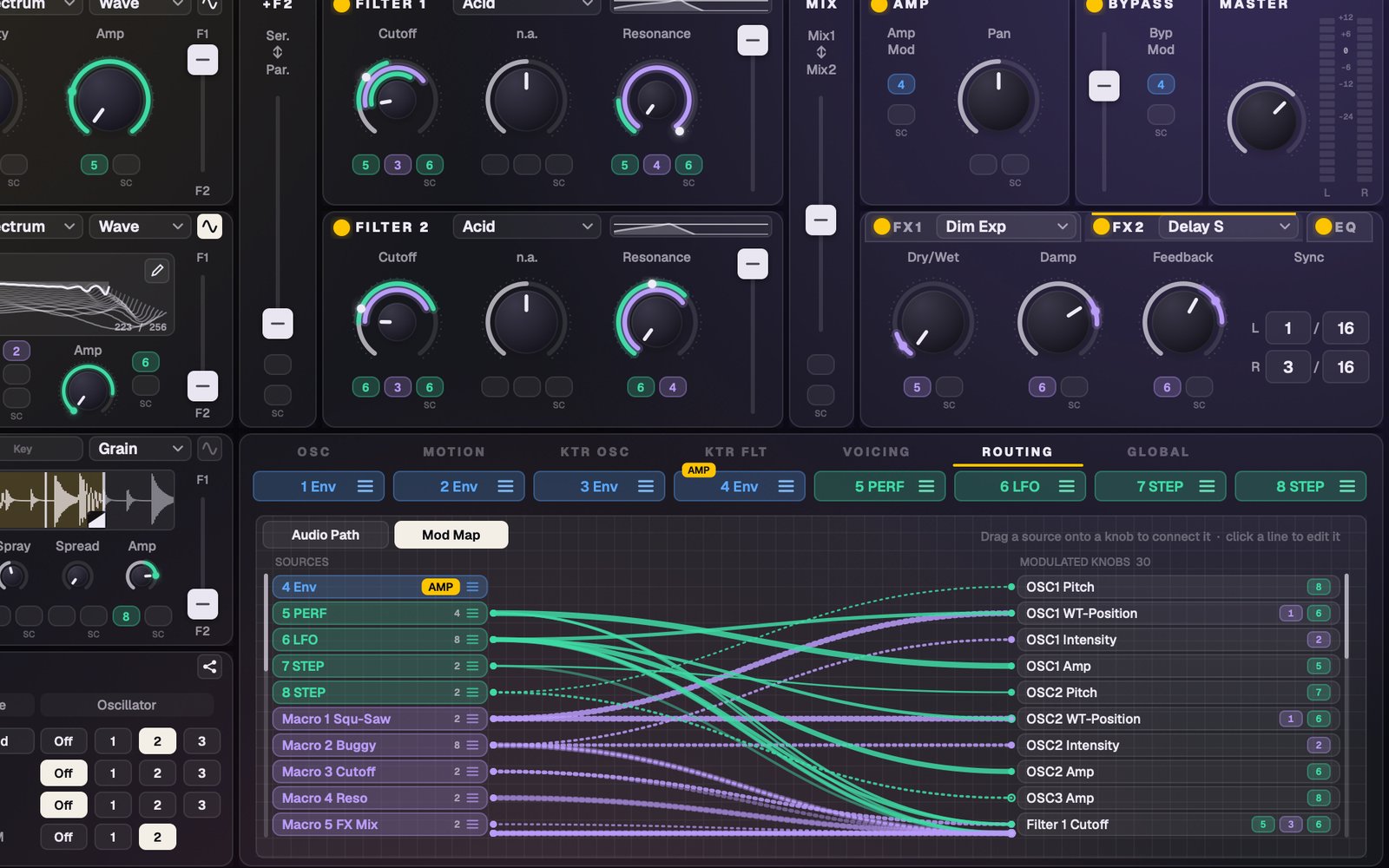
  • Live modulation dots on every knob, and playheads on every Envelope, LFO, Performer and Stepper
  • Live filter curves, EQ graph, 2D and 3D wavetable views, scope and spectrum
  • A signal flow you can rearrange, with dots showing where the audio is going
  • A Mod Map with every connection on one page
Live modulation and the Mod Map
03

Four sources in every oscillator

Wavetable, Sampler, Granular or Audio In.
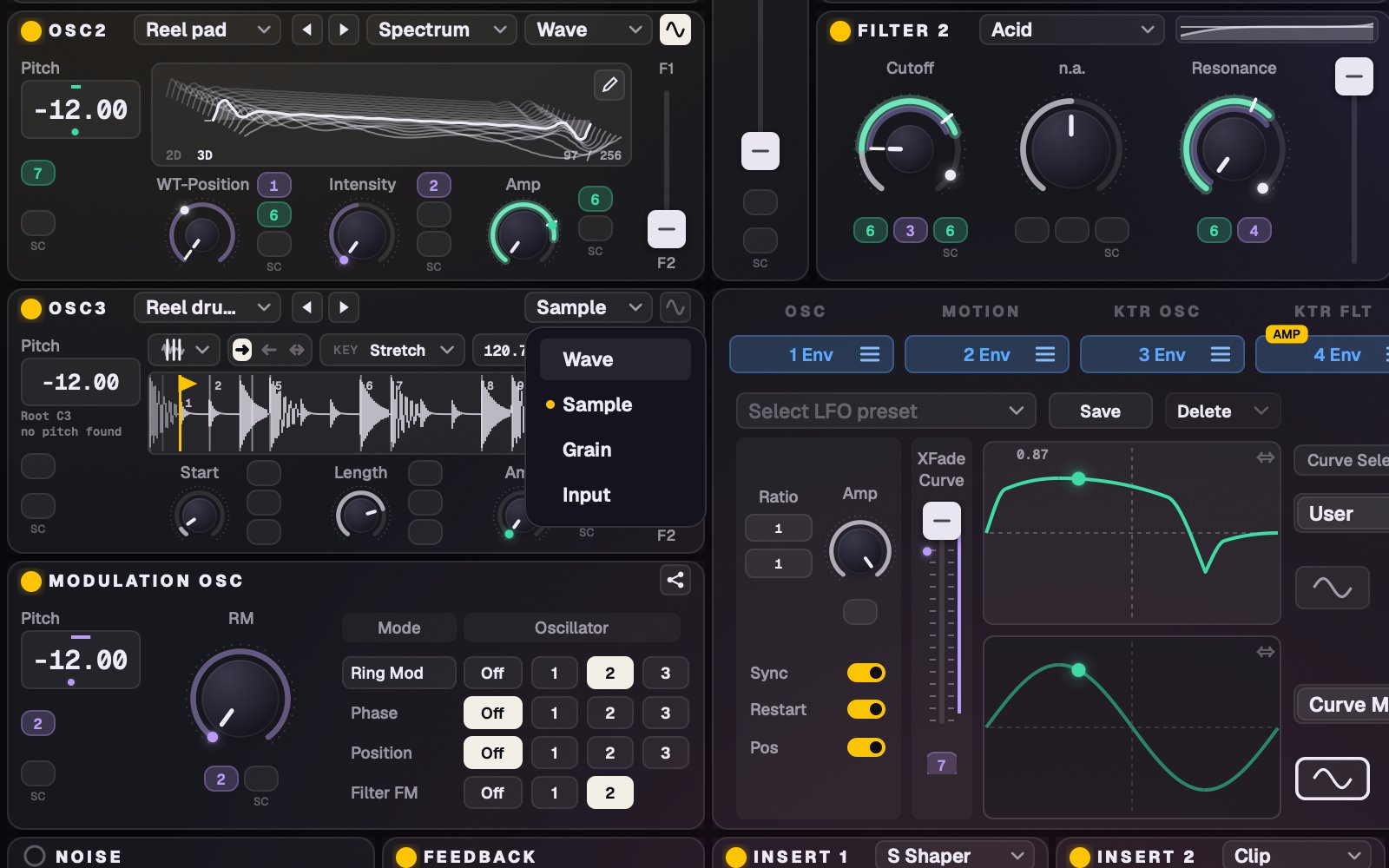
  • Drop any audio on an oscillator and pick what it becomes
  • Play your own samples through unison, filters, inserts and effects
  • Run a live input or sidechain through the synth
  • Drop audio on the Noise panel for your own looping noise
Oscillator sources
04

A real sampler inside

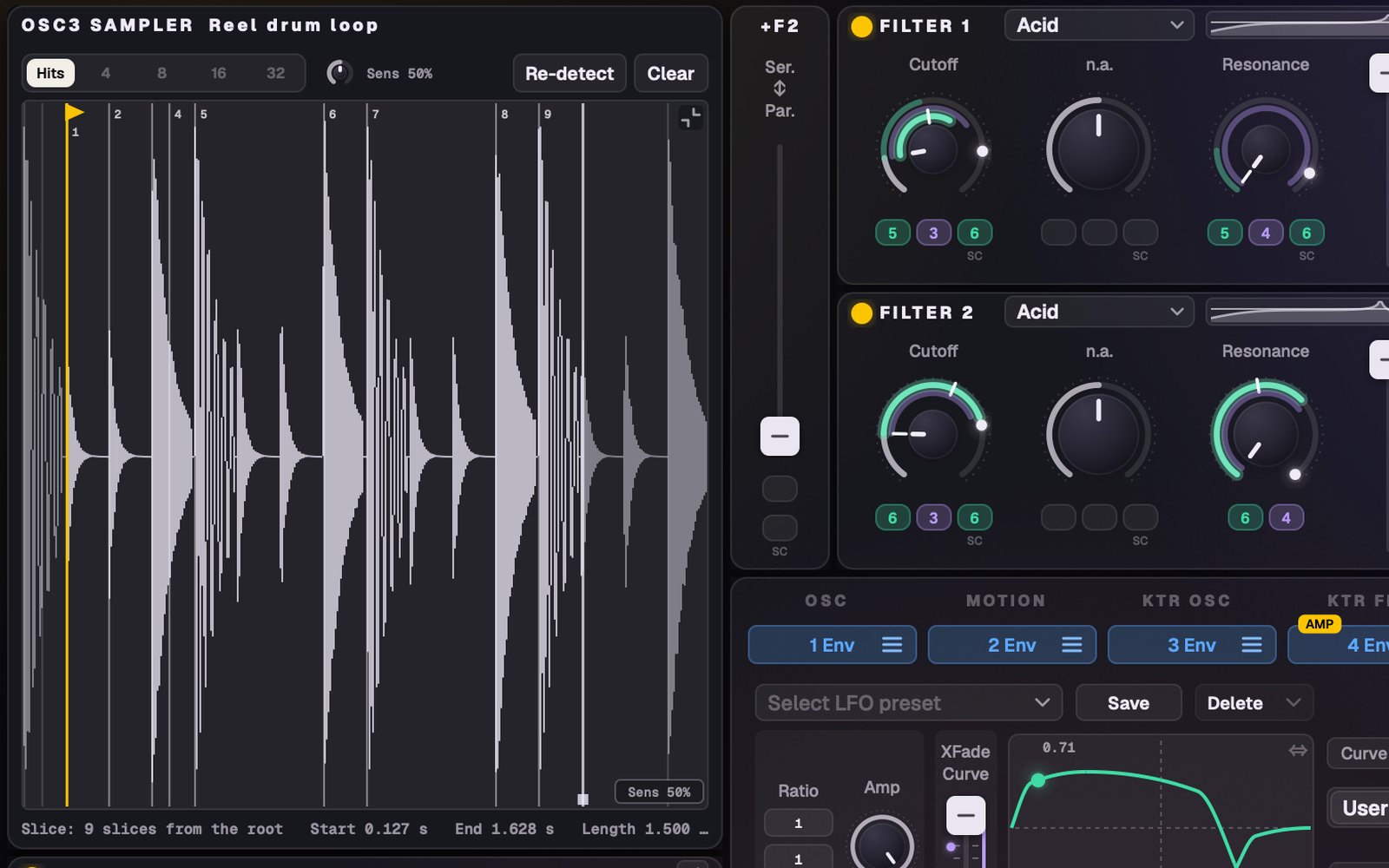
Drop a loop. Play it in time.

  • Slice at the hits and play the slices across the keys
  • Stretch and Sync keep loops at your song's tempo
  • Root note and level are detected for you on drop
  • One-shot, Loop or Run, with Start and Length you can modulate
The sampler
05

Draw your own wavetables

A full wavetable editor, right in the synth.
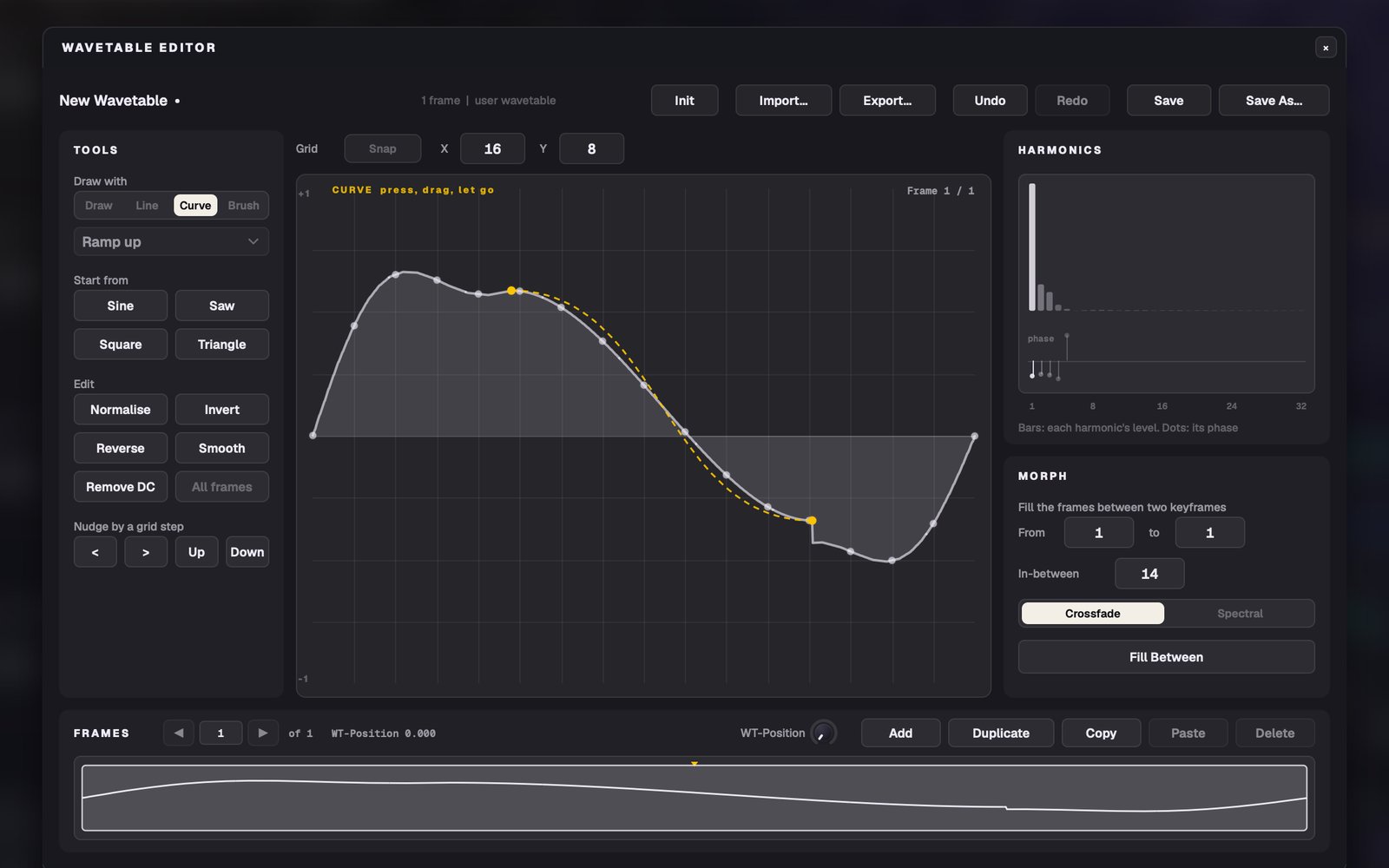
  • Freehand, line, curve and shape brushes
  • Up to 256 frames, with harmonics and phases when you need them
  • Morph between two frames in one click
  • Hear every change while you play
The wavetable editor
06

Sequence anything

A Stepper and Performer that go much further.
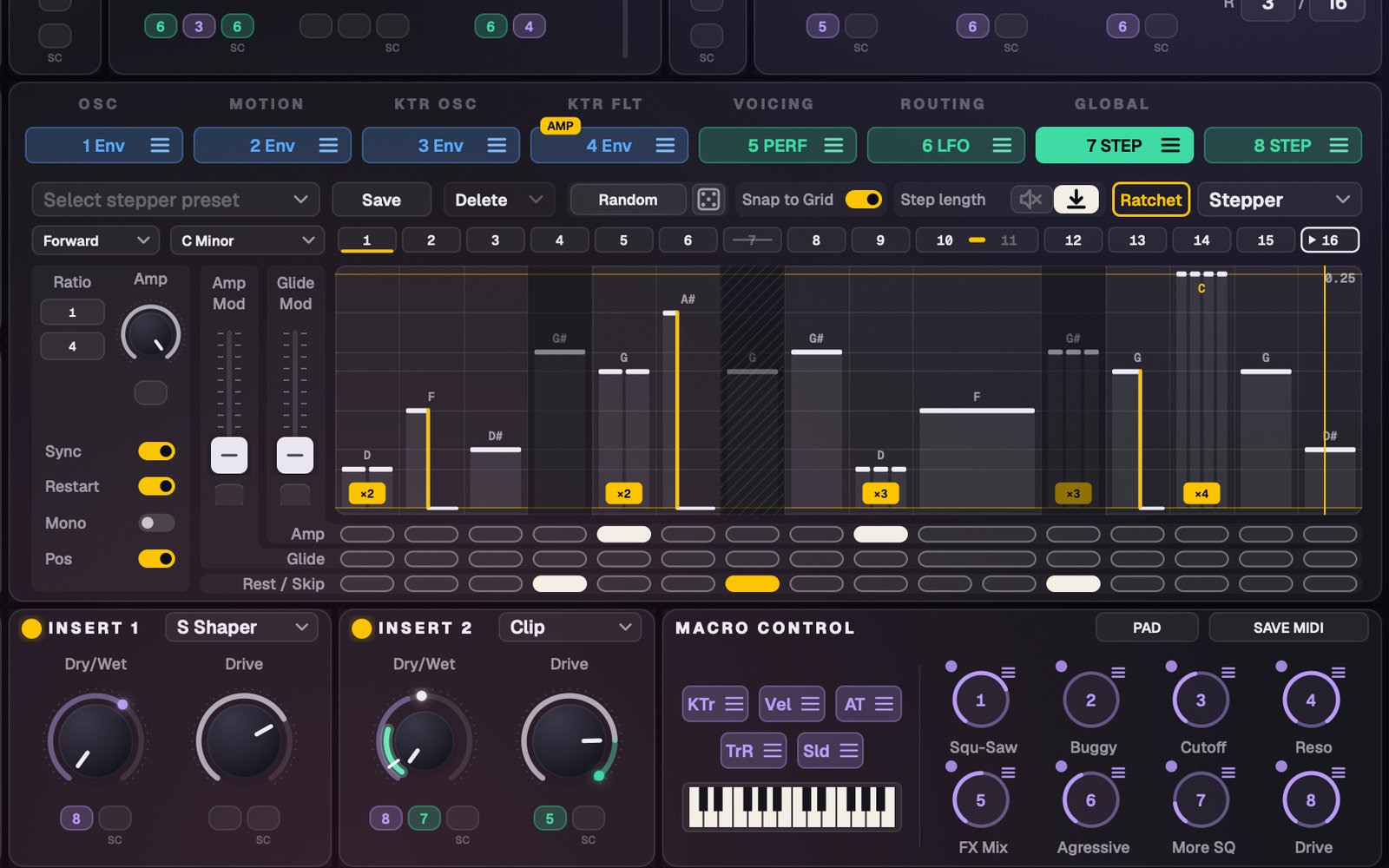
  • Ratchet any step, 1 to 4 hits
  • Tie, shorten, rest or skip steps. Rests keep the timing; skips change the pattern
  • Forward, backward, ping-pong and random playback
  • Snap steps to a key and scale, or roll a fresh pattern
Performer and Stepper
07

Make Massive move

Draw your own modulation, then let it play.
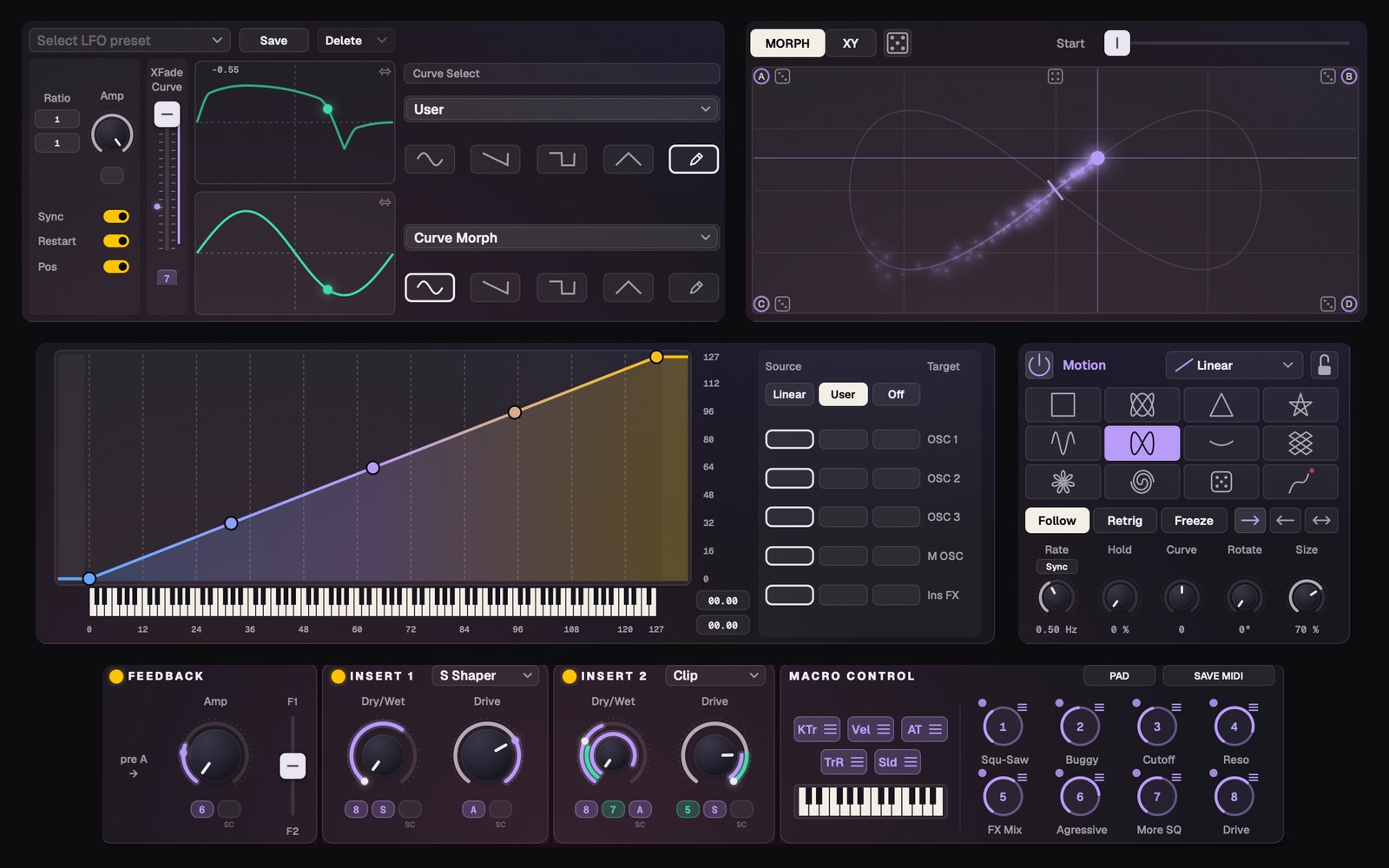
  • Draw LFOs, Performer curves and envelope morph shapes
  • Curve every attack, decay and release, and draw your own key-tracking
  • Morph and XY pads: blend all 8 macros across four corners
  • Let a Motion shape move through them in time, or grab two macros at once on the XY
Morph and Motion pads
08

Expression on every note

Play a chord, and every note moves on its own.
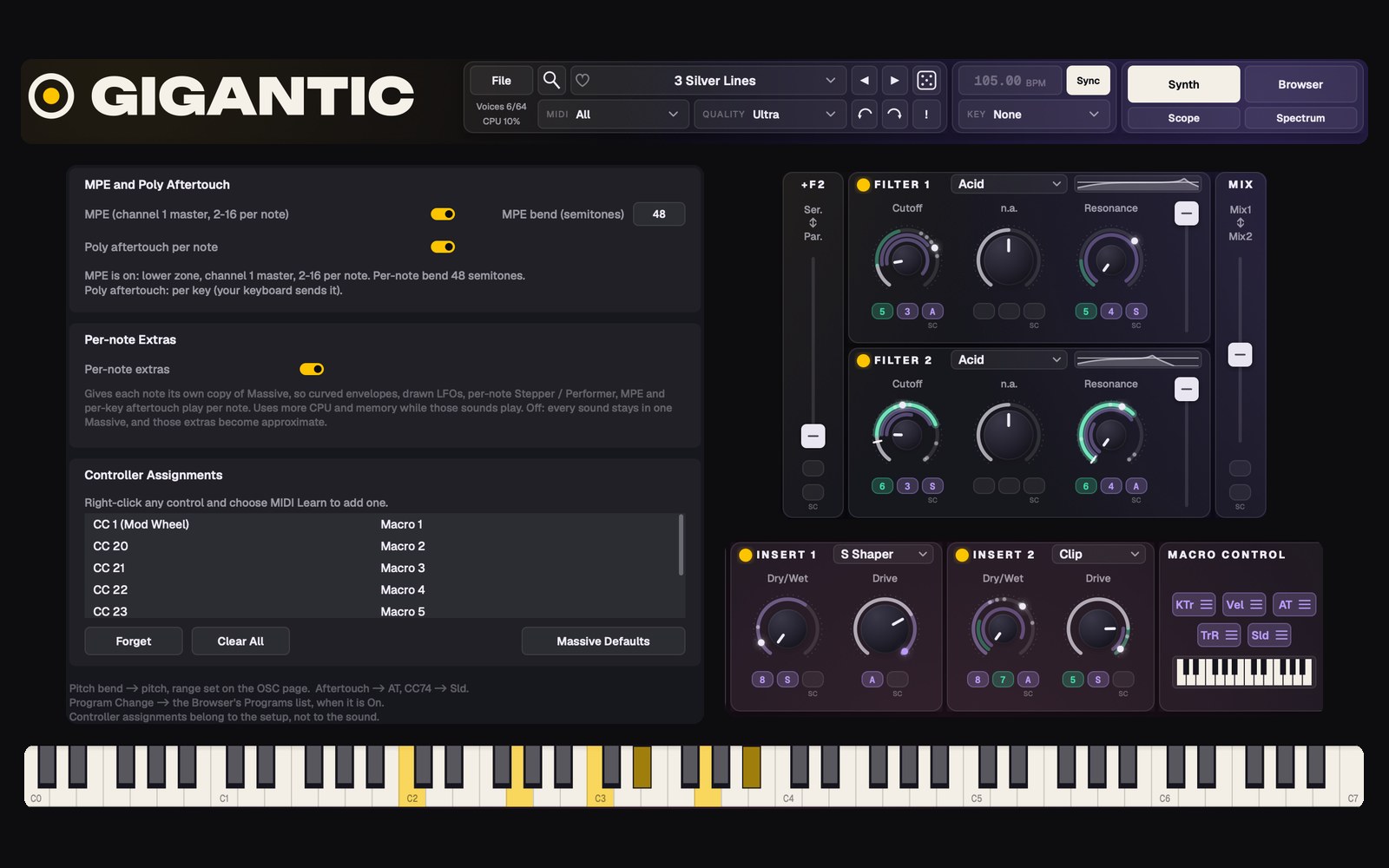
  • MPE with per-note bend, pressure and slide
  • Per-key poly aftertouch, for keyboards that send it
  • Per-note mode: up to 64 voices, each with its own modulation
  • MIDI Learn on every control and full DAW automation
Per-note expression
09

Find it, then make it new

Get to the right sound faster.

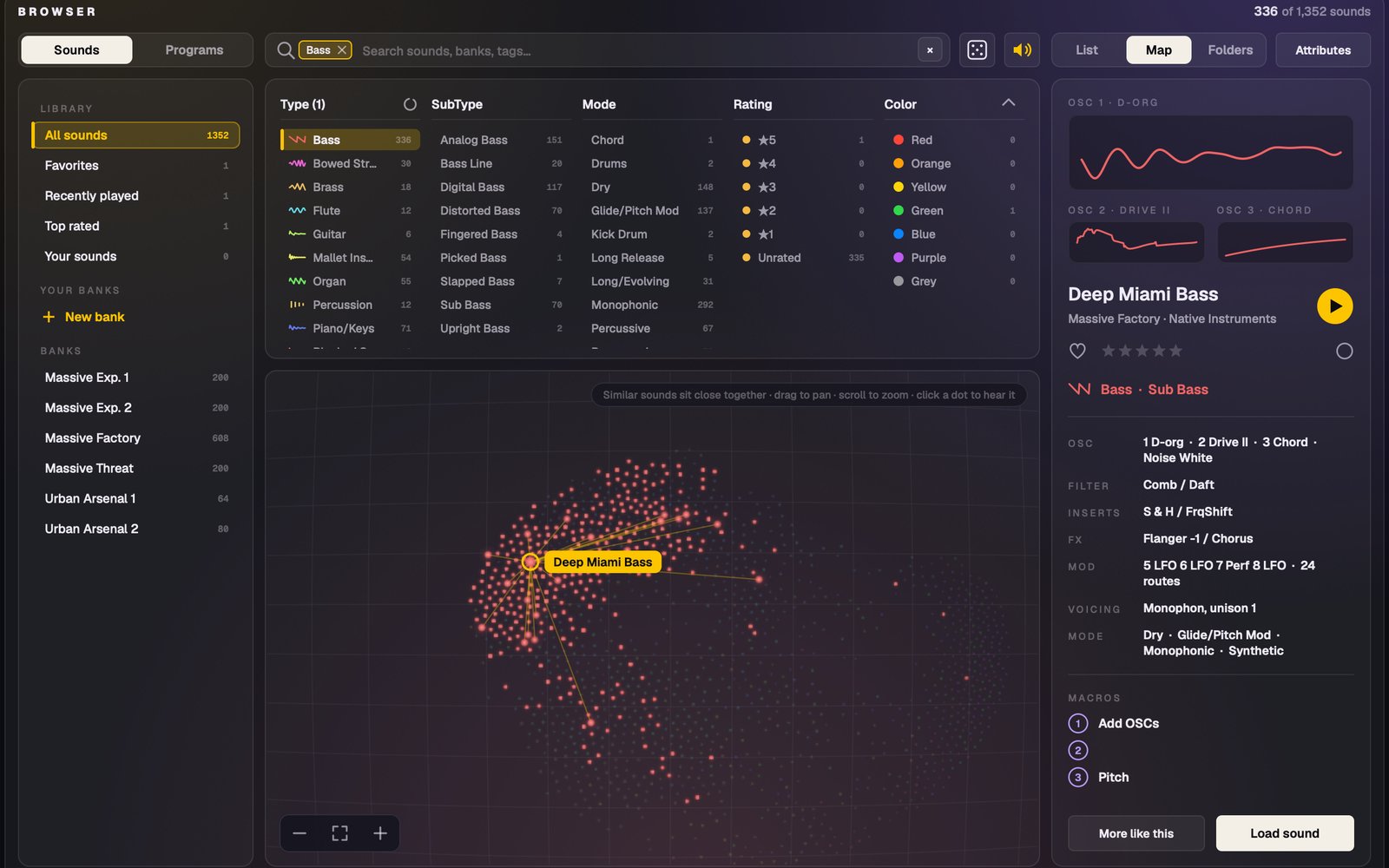
  • Hear any preset before you load it
  • A sound map: find more sounds like the one you love
  • Favorites, ratings, color tags and your own banks
  • Roll musical variations, go back to any roll, and undo up to 100 steps
The browser and sound map
10

Run it your way

A synth and an effect, wherever you work.
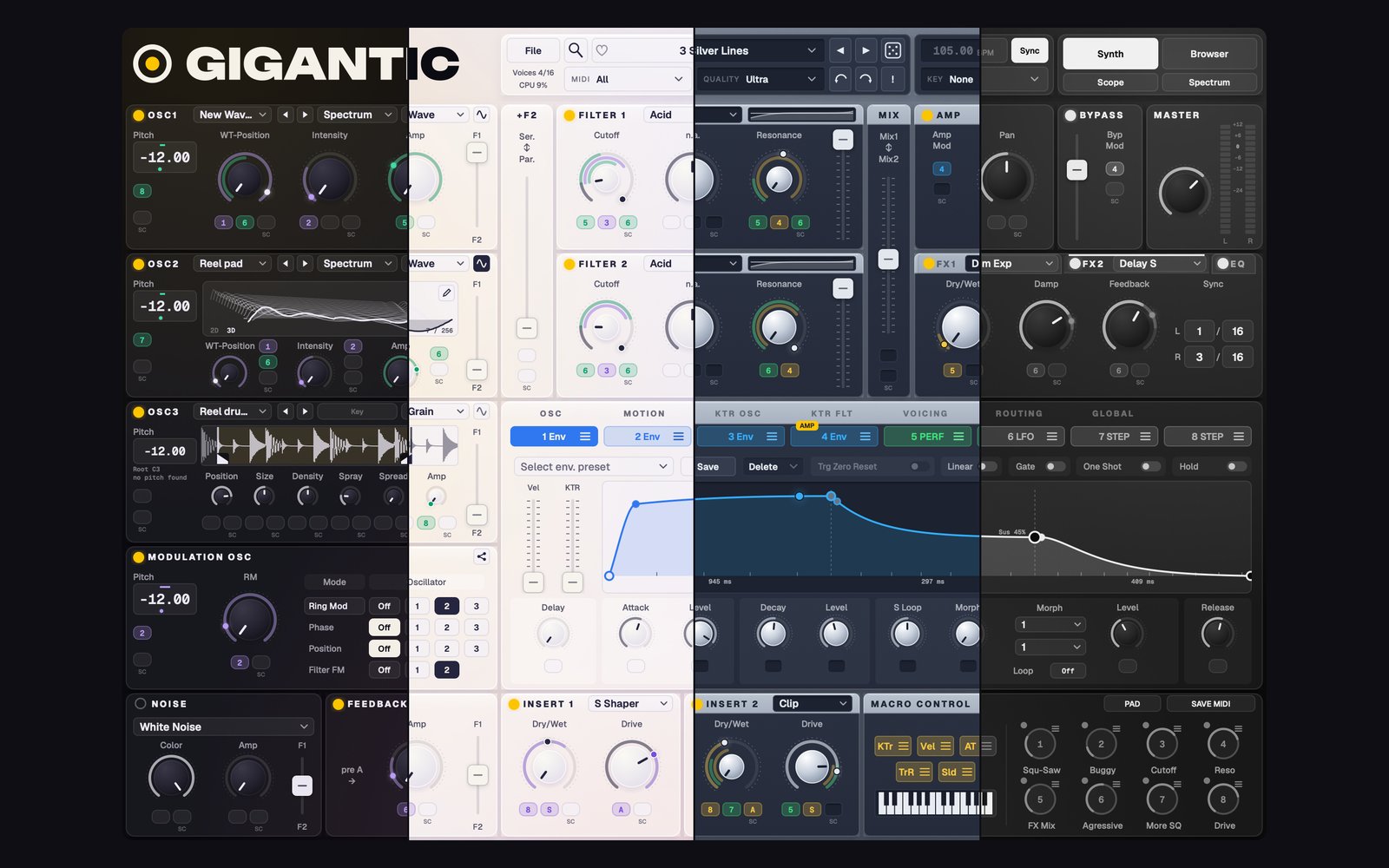
  • Standalone, AU and VST®3 for Mac / PC
  • Gigantic FX included: put Massive's filters, effects and modulators on any track
  • Four themes to match your setup
Gigantic's four themes
Coming soon

Be first to hear when it's out.

Join the list and you'll get an email the day Gigantic launches. No spam, unsubscribe any time.

Requires your own licensed copy of Native Instruments Massive. Mac and PC.

One payment. Yours for life.

Nineteen dollars. That's it.

Gigantic + Gigantic FX
$19
One payment. No subscription.
  • Gigantic: Standalone and VST3 on Mac and PC, plus AU on Mac
  • Gigantic FX: the effect version, in the same formats
  • Every 1.x update, free, emailed to you
  • No keys, no activation, no online checks
  • Install on the computers you use, Mac or PC
  • Instant download. Sales are final once downloaded
Get Gigantic - $19

Gigantic is made by one person, and I kept the price fair on purpose. Your $19 directly supports me and keeps new tools like this coming. Thank you for being part of it.

What you need

Before you buy

Massive

Your own licensed Native Instruments Massive (not Massive X), installed and authorized in Native Access, with its VST3.

Mac or PC

Mac: macOS 12 Monterey or later. Made and tested on Apple Silicon (M1 or newer); it also runs on Intel Macs, but they aren't officially supported. PC: Windows 10 or 11, 64-bit.

Formats

Standalone app and VST3 on Mac and PC, plus AU on Mac. Works in Logic, Ableton Live, FL Studio and other DAWs.

Questions

FAQ

Do I need Massive?

Yes. Gigantic is a front end for Massive, and your own installed, licensed copy of Massive makes every sound. Gigantic includes no Native Instruments software, sounds or wavetables.

Does it work with Massive X?

No. Gigantic is built for the original Massive.

Does Gigantic FX need Massive too?

Yes. Gigantic FX runs your audio through your own copy of Massive, so Massive needs to be installed and authorized.

Does it run on Mac and PC?

Yes, both. Mac: macOS 12 or later. PC: Windows 10 or 11, 64-bit. One purchase covers both.

Which formats does it come in?

Standalone app and VST®3 on Mac and PC, plus AU on Mac. Gigantic FX comes in the same formats. AAX for Pro Tools is being looked at for after launch.

Can I try it before I buy?

There's no demo. Gigantic is a download, so sales are final once it's downloaded. Before you buy, check you have your own licensed copy of Massive (not Massive X) on macOS 12 or later, or Windows 10 or 11 (64-bit).

Do my Massive presets work?

Yes. Every Massive preset loads and plays the way it always has. Gigantic's extra features start switched off, so your sounds stay yours. Sounds you save in Gigantic are .gigantic files: they open in Gigantic, not in Massive on its own.

Does it replace Massive in my old projects?

No. Massive keeps working exactly as before. Gigantic is a separate plug-in you can use in new projects, and it opens your Massive sounds.

Which DAWs does it work in?

Any DAW that loads VST3 (or AU on Mac), including Logic Pro, Ableton Live and FL Studio. There's also a standalone app.

Does it support NKS?

No. Gigantic isn't NKS, but there's a fully mapped MIDI template for Kontrol S MK3 keyboards.

Does it run on Linux?

No. Massive itself doesn't run on Linux, so Gigantic can't either.

How do updates work?

Gigantic tells you when a new version is out (it checks about once a week and never installs anything by itself). Every new version is emailed to you, and the link in your order email always has the latest one. Your sounds and settings stay. Every 1.x update is free.

Is there a license key or activation?

No. No keys, no activation, no account. Install it and play.

Is Gigantic made by Native Instruments?

No. Gigantic is an independent product of The Signal Supply. It isn't made, endorsed or supported by Native Instruments, so please send any Gigantic questions to us.

Something isn't working. Who do I contact?

Use File › Report a Bug inside Gigantic, or email [email protected].

Same Massive.
A whole new way to play it.

Join the list Get Gigantic - $19

Requires your own licensed copy of Native Instruments Massive. Mac and PC.